Preffect 3.0: Less to remember. More that counts.
Preffect 3.0 is out now.
Most updates add things. This one is mostly about taking things away: the screens you had to open, the taps you had to get through, and the blank days that made real effort look like no effort at all.
Every change in 3.0 started from the same question. What does Preffect ask of you, and does it need to?
Here’s what’s new, and the thinking behind each piece.
New in 3.0
- Habits that look like your day. Habits now come in four kinds, so 5 of 8 glasses shows as 5 of 8, and rest days stay rest days.
- Log a Habit from your lock screen. One tap to log. No unlocking, no opening Preffect.
- Connections, front and center. Connect your data whenever you’re ready, right from Home.
- Lots of small fixes. Logging and goals take a little less effort, everywhere they show up.
Why habits became four kinds instead of one
The old habit card treated every habit as a yes-or-no question, one checkbox per day. That fits a habit like “meditate 10 minutes.” But when we looked at the habits people actually wrote, only about 16% work that way. Most are something else.
- Amounts that add up through the day. “Drink 8 glasses of water” is the single most common habit, followed by steps and protein.
- Counts of separate things. Two servings of vegetables, or three meals.
- Once-a-day habits. The ones the checkbox was built for.
- Times-per-week habits. “Strength train twice a week.”
A single checkbox got three of those four wrong.
- Partial effort disappeared. A day at 6 of 8 glasses looked exactly like a day at zero, with the same blank.
- Rest days looked like misses. A “run 3x a week” habit was drawn as seven daily slots, so four planned rest days showed up as four empty boxes.
- New habits started with nothing to do. Set one up at 2pm, and there was nothing you could move until midnight.
That’s the exact pattern that makes people quit health apps: being graded pass or fail, and judged on days you never meant to count. The checkbox was doing it quietly, on the first screen you see.
Four kinds let a habit describe your day the way you lived it.
- “5 of 8 glasses, and it’s 2pm.”
- “1 of 2 this week,” with rest days not drawn at all.
- One tap that moves something today.
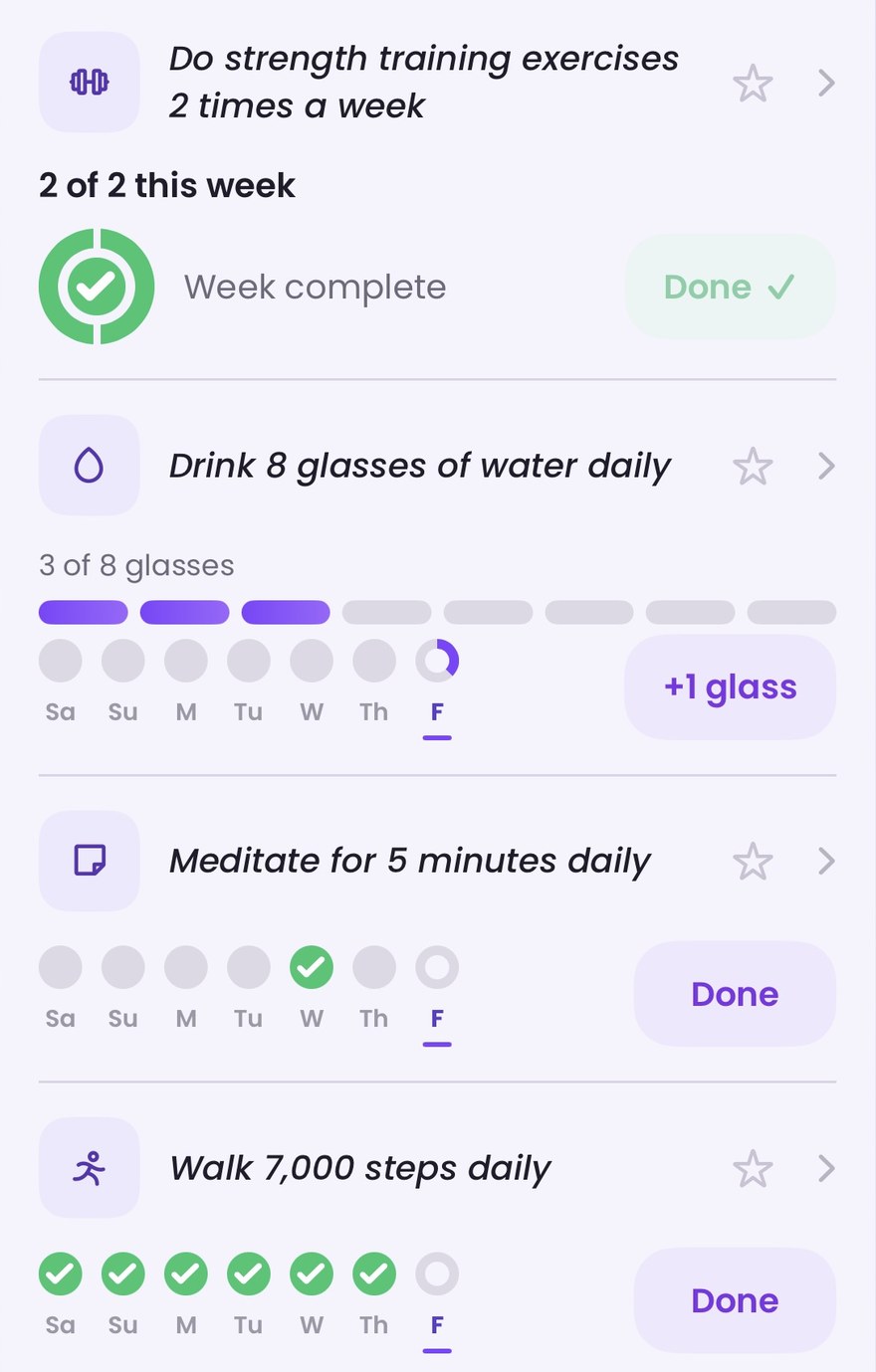
The feeling we were after is simple: it counted what I actually did.
What we held back on matters just as much. The type and the number come only from your own words, and the card shows them back so you can fix anything we got wrong. If the type isn’t clear, the card stays a checkbox. We never invent a target for you. And if what you write sounds like restriction, Preffect responds with support instead of turning it into a number to hit.
Why logging moved to your lock screen
This sounds like a convenience feature. It’s really about what each visit to Preffect costs you.
Logging one glass of water used to take about seven steps: unlock your phone, find Preffect, wait for it to load, go to Home, open your habits, tap + Log, confirm. For an amount-based habit, that’s eight times a day.
The seconds aren’t the real cost. Each visit asks you to remember Preffect exists, decide it’s worth your attention right now, and then walk into a screen full of other things: insights, your Quick Win, whatever you haven’t gotten to yet. Every open is a small demand. When you don’t have much bandwidth to spare, those demands add up until the habit stops getting logged. Then Preffect stops getting opened.
There was a reach problem too. About 40% of people turn notifications off, so the morning after they set up a habit, they heard nothing from us. And for people who did allow notifications, the log button was hidden behind a long-press.
The new lock screen card fixes both. It appears on your lock screen each morning as a Live Activity, and its permission is separate from notifications. It shows your habit in your own words with one button: “+1 glass” or “Done.” Tap it and the log saves in the background. Preffect never opens.
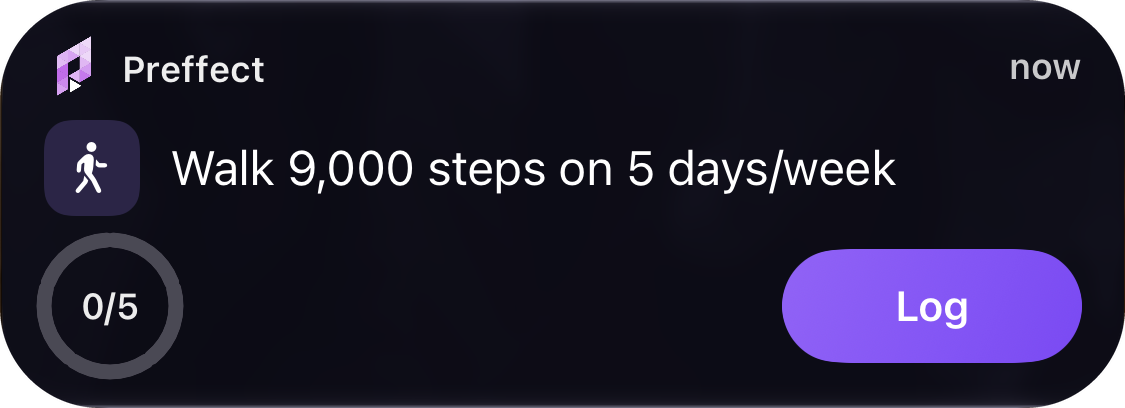
It’s quiet on purpose. It’s never red, never says “missed,” and clears itself after eight hours. If you keep swiping it away, it shows up less often. Prefer something that’s always there? The widget is the same card, for anyone who wants to place it.
Here’s how we’ll know it’s working. We’re judging this on whether you come back and log, not on how often you open Preffect. We actually expect opens to go down, and that’s fine. The principle is simple: log without opening, learn by opening. Opening Preffect should be for insight and understanding, not for paying a small attention tax to record a glass of water.
This is also why we rebuilt the habit card first. Every lock screen surface is just another way of showing that card. If the card still showed a partial day as a blank, that blank would now be on your lock screen.
Why Connections got its own place on Home
A lot of people don’t connect their data on day one, and that’s reasonable. Handing something new your health data is a real ask. Many people want to use Preffect for a while first and decide whether it’s earned that.
The problem was what happened next. Once you skipped, the only way back was a “Connect others” row at the bottom of Profile, or Connected Apps & Devices inside the menu. So the people who meant to connect later had nowhere obvious to go. By the time they were ready, the option was out of sight. Some never found it.
Now Connections have their own card on Home, and “later” finally has somewhere to land. Whenever you decide Preffect is worth trusting with your data, the way to act on it is right in front of you, not buried in settings.
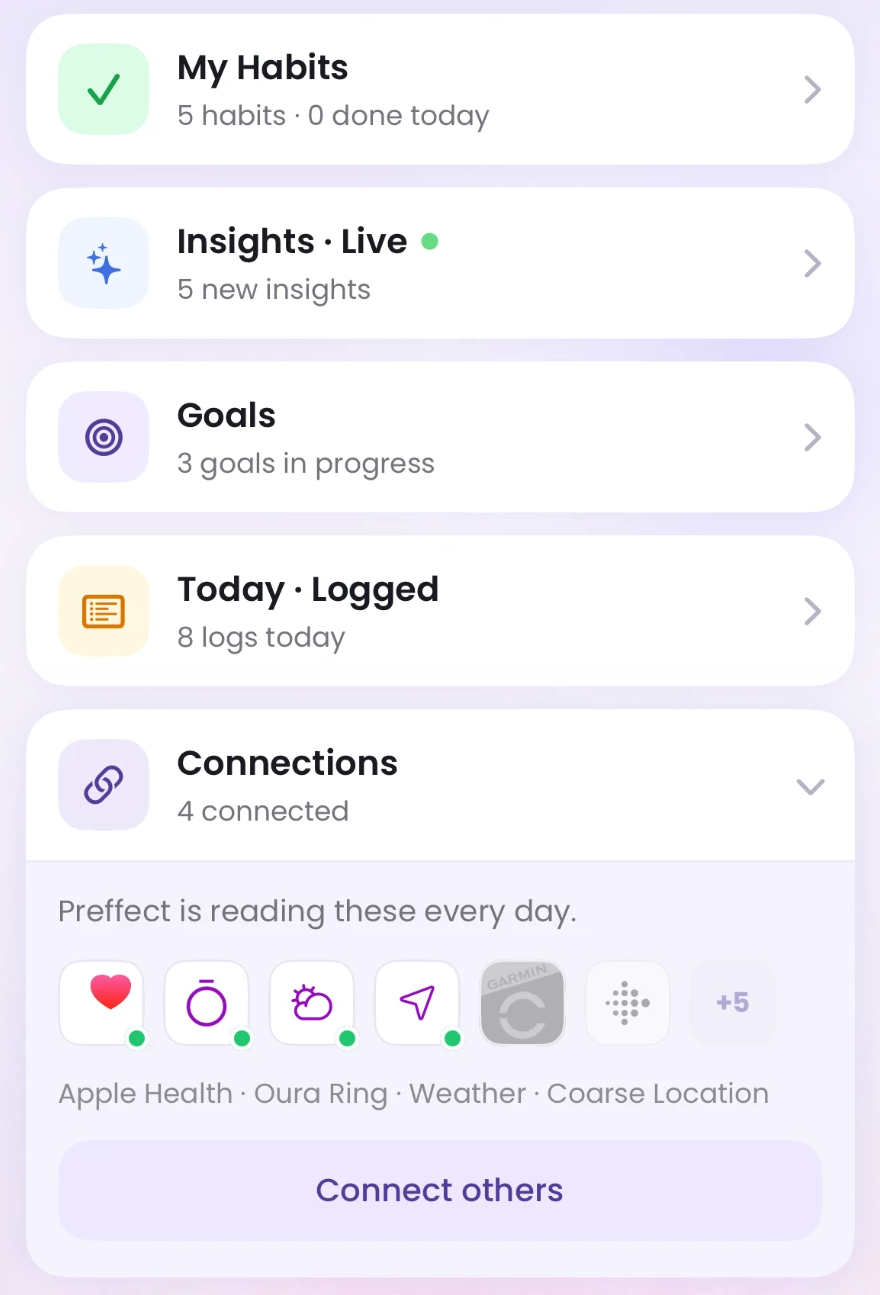
It also reflects where the value comes from. Every source you connect, like Apple Health, Apple Watch, or your calendar, gives Preffect more days and more kinds of information to work from. That means what it tells you is grounded in your real life sooner. As we add more integrations, they’ll show up here instead of going unnoticed.
Connections are also the other half of the lock screen story. The lock screen makes logging one tap. A connection makes it zero. Every night of sleep, step count or workout your devices send on their own is something you never have to remember, open Preffect for, or type in. Connections let Preffect learn more about you while asking less of you.
What it adds up to
Taken together, 3.0 asks less of you in three ways. Fewer screens to get through. Fewer things to remember. And no more blank days hiding the effort you actually made.
Update Preffect and your habits will look a little more like your day. New here? Preffect is free to start.